
- Storage operations
- Rental lifecycle
- Connected commerce
Easy Storagestorage rental operations
From a reserved space to a managed customer relationship.
A storage rental continues long after checkout. Easy Storage connects the space, tenant, agreement and billing periods in one working context. Online orders, office bookings and existing contracts meet in the same system, so the team can serve the customer throughout the rental.
- Live product The product is in real use with live customer orders and day-to-day operations.
- License updates Continuous improvements, UX refinements and functional updates are delivered through the ongoing development license.
- Suomi (Finnish)
- English (English)
- Svenska (Swedish)
- Eesti (Estonian)
ReApptor can build multilingual workflows for teams and customers working across markets!
Case overview
Business problem
A sale is only the beginning
Storage operators must answer different questions about the same space: is it available to rent, who is using it, when does the agreement end, and how far is the rent covered? A paid online order, a company payment commitment and a move to another unit each change the answer. The operational challenge is keeping these relationships visible as contracts and payments change.
One rental, connected responsibilities
ReApptor developed Easy Storage within the EasyMove application for the people who sell, administer and use storage space. Managers work with the warehouse and rental details; customers see their own agreements. Shopify, Bold Subscriptions and LogiApp connect the relevant commercial and operational steps, while the rental keeps its customer, dates, payments and history together.
The rental in everyday work
Follow the space through the whole agreement.
The workflow brings a purchase into warehouse administration and keeps the agreement actionable through changes, payment follow-up and completion. Each stage has a concrete place in the product.
-
Establish the rental
A paid Fiksuvarasto order can create a rental for the matching storage unit. The team can also record a rental directly in the office. The record identifies the customer or company agreement, space, start and end dates, billing interval and any additional products or payment commitments.
-
Manage the occupied space
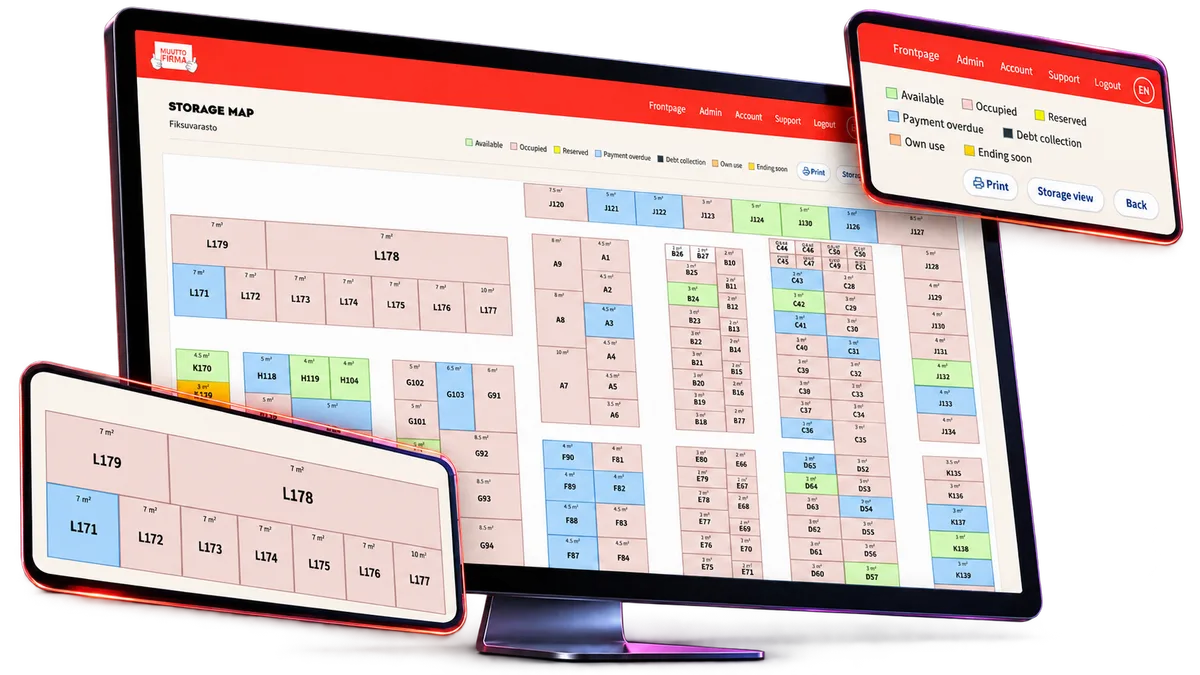
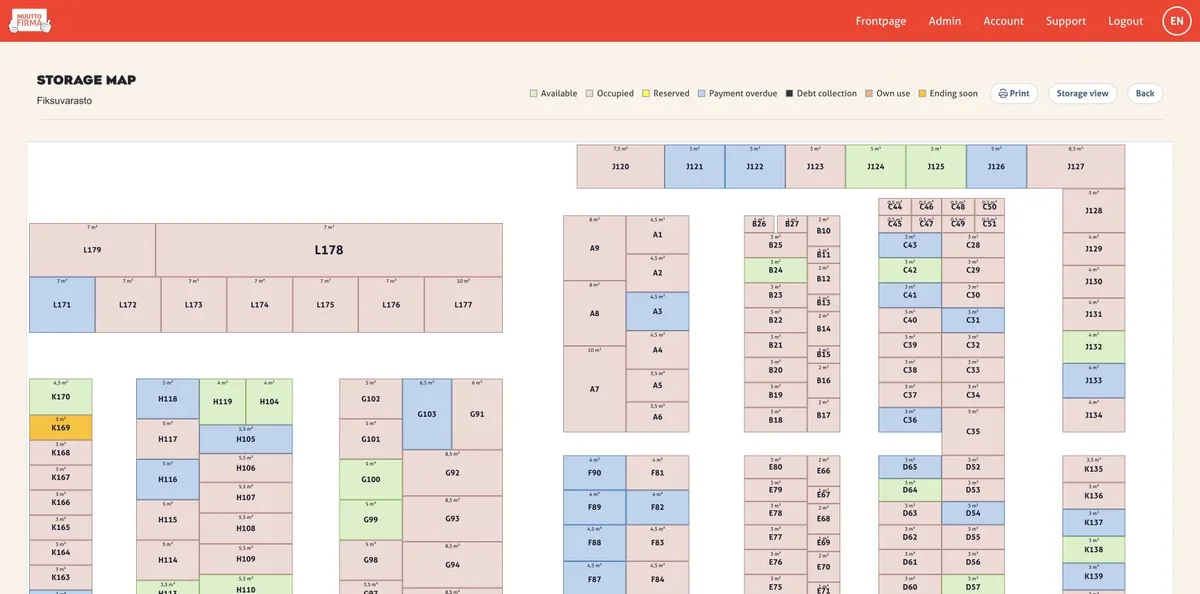
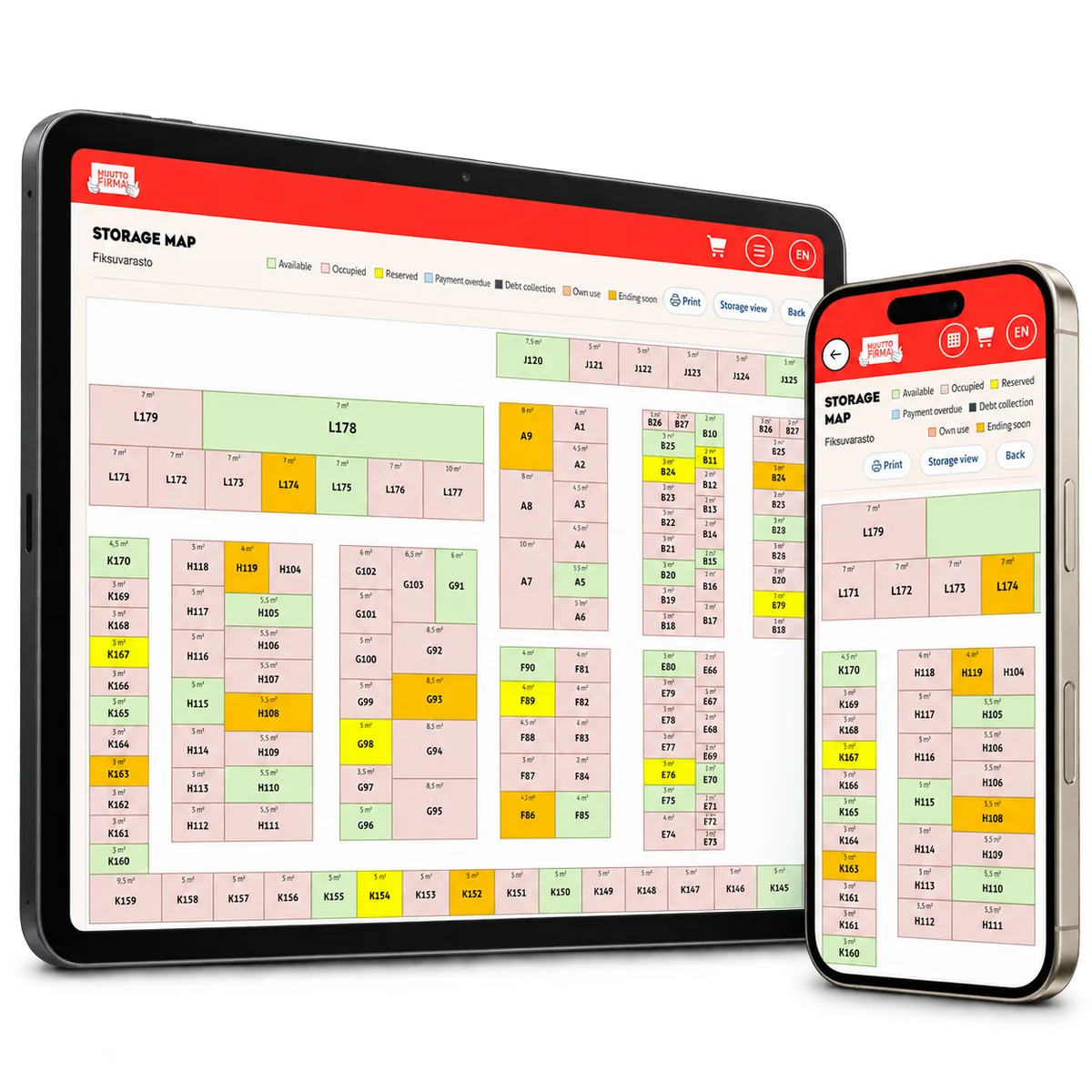
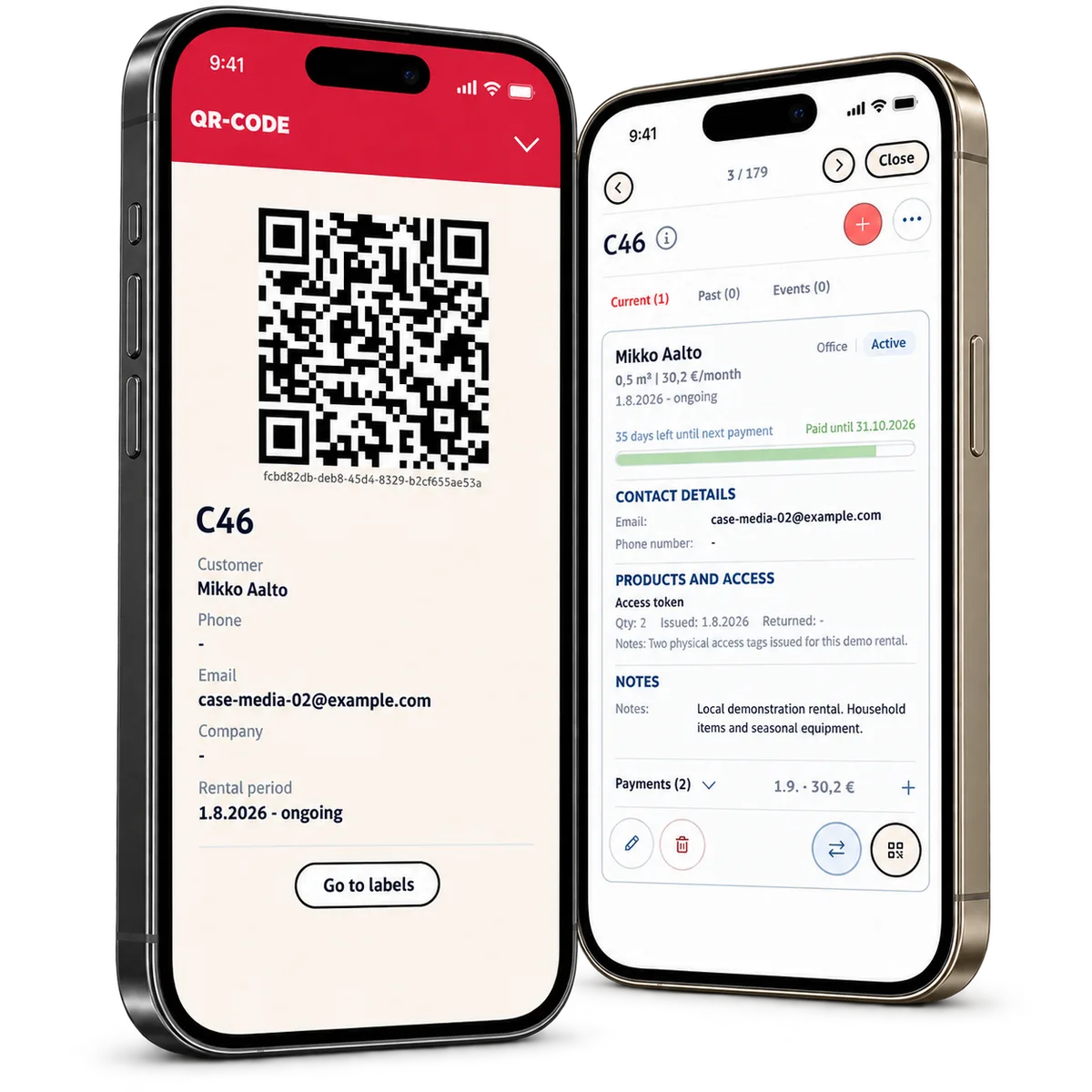
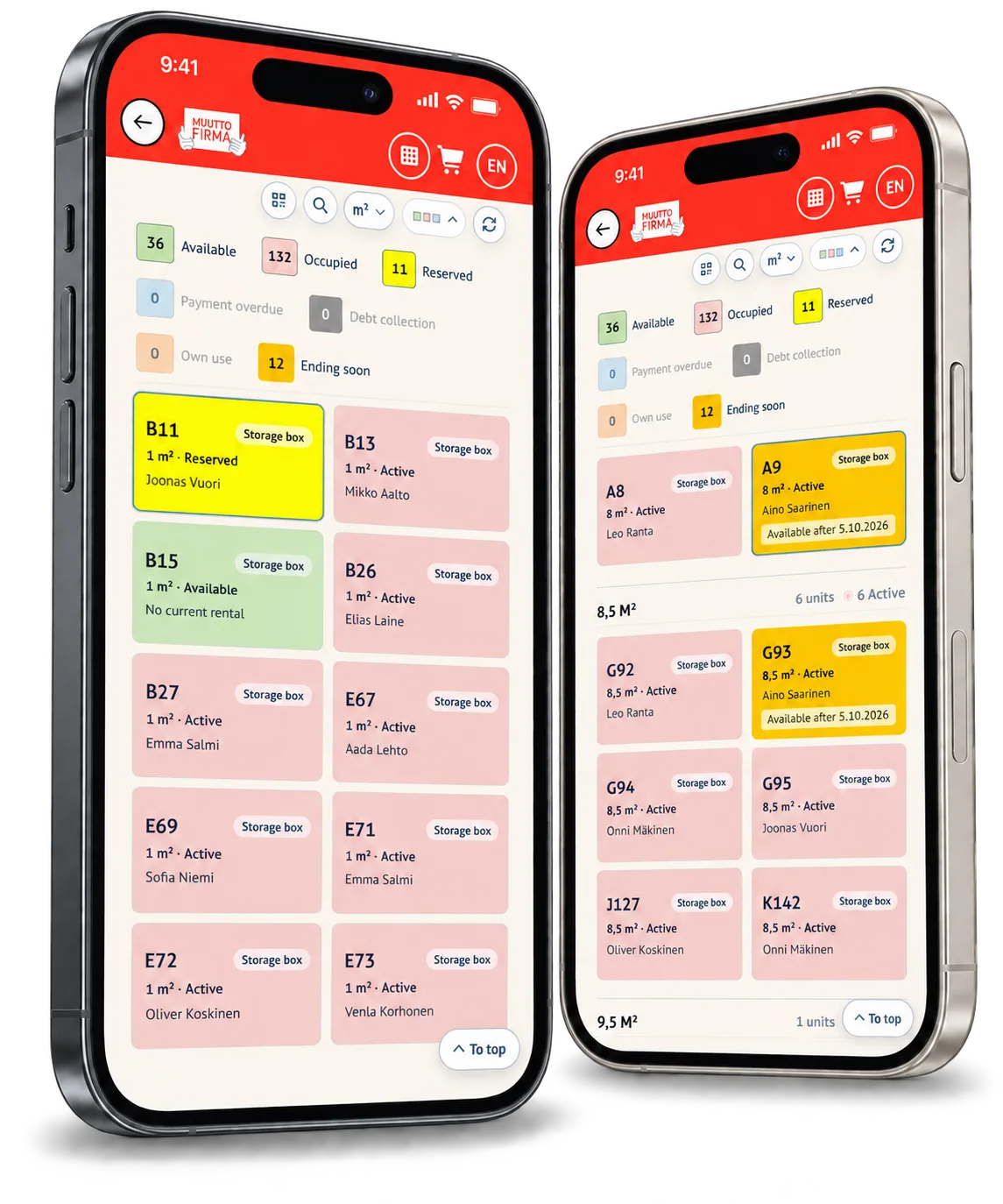
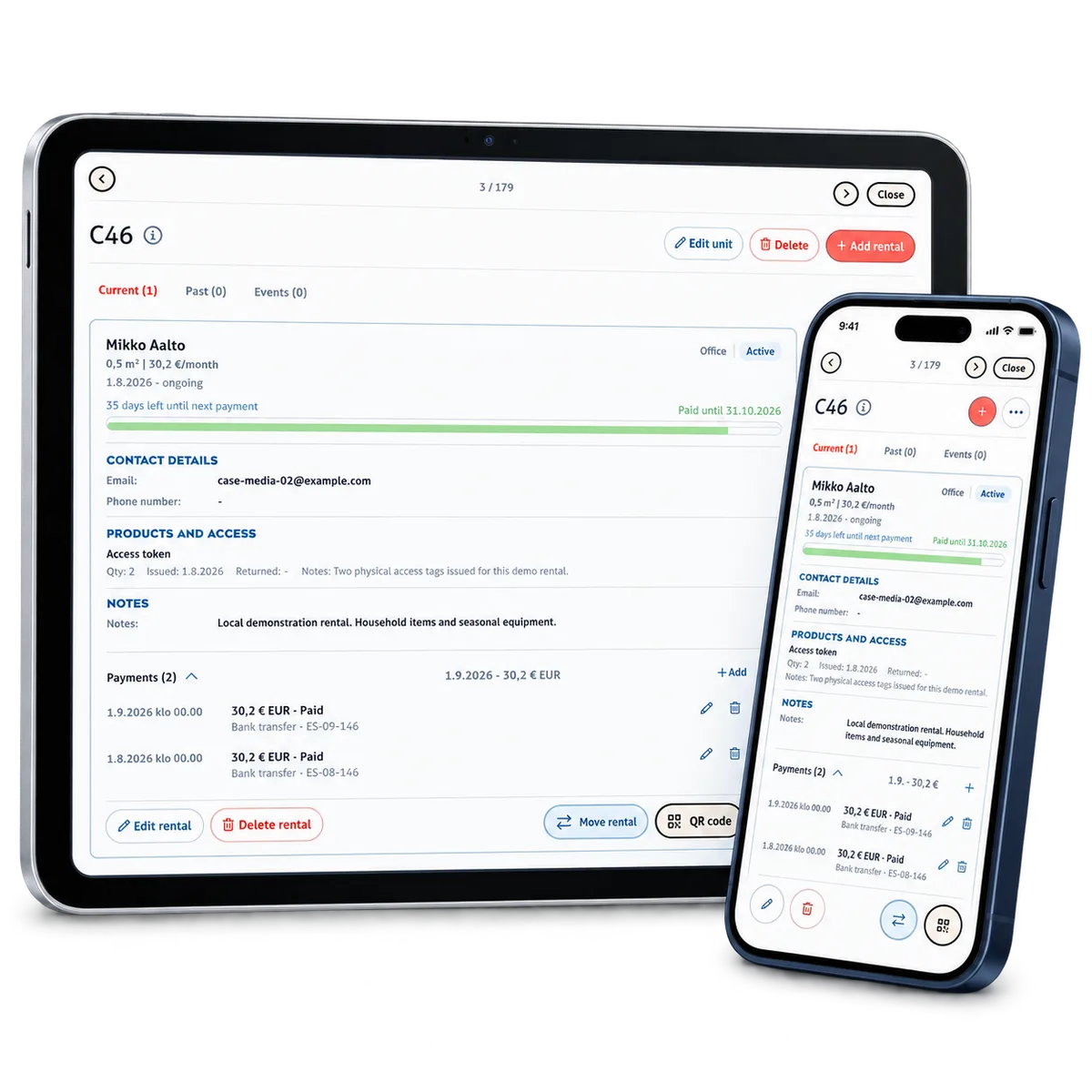
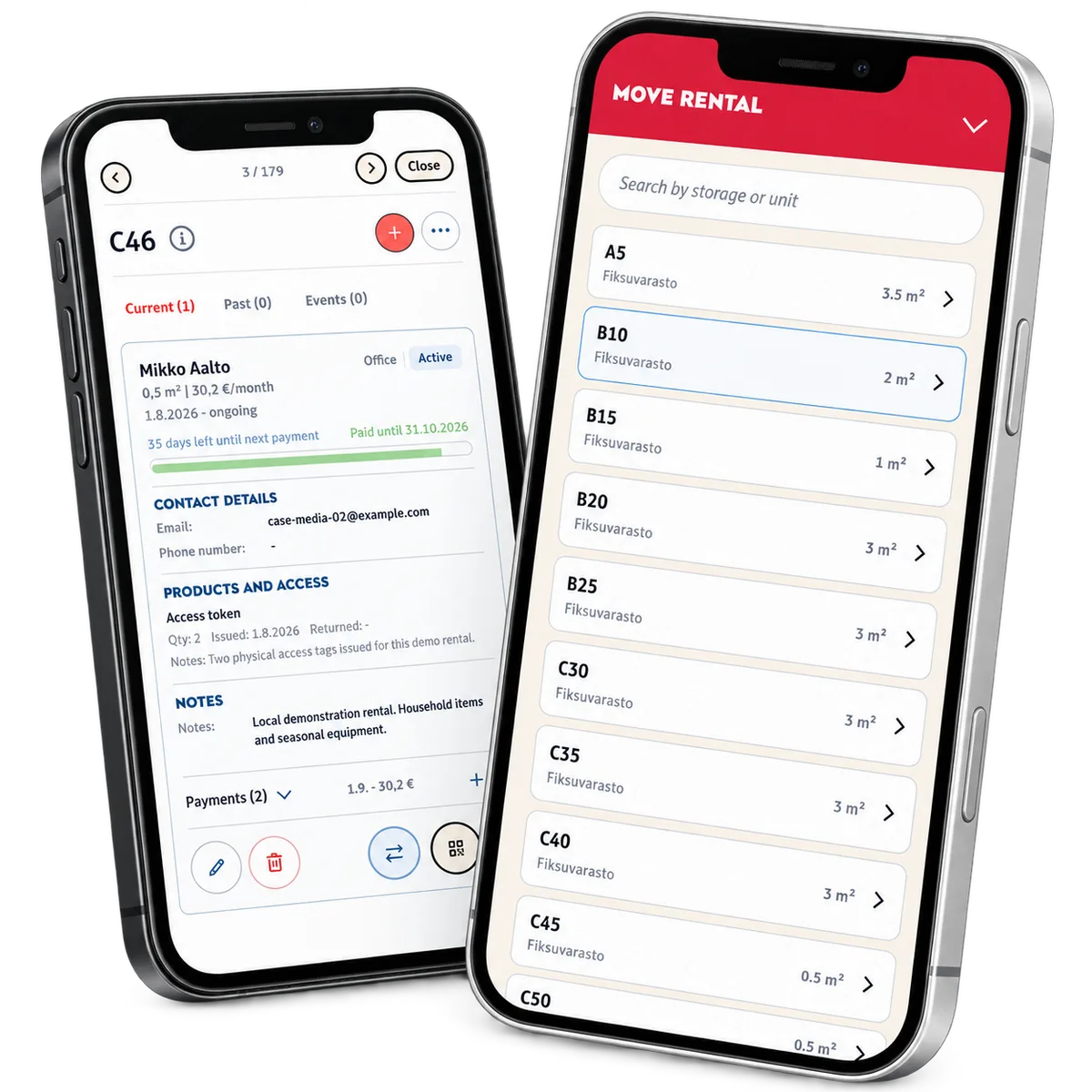
The warehouse map leads into the unit and its current rentals. Staff can distinguish an upcoming reservation from an active or overdue agreement, inspect payment coverage and record issued or returned access items. When a tenant changes units, the transfer records both the source and destination and updates the rental label.
-
Follow up and close the agreement
As dates pass, the service updates rental states and alerts administrators to newly overdue payments and agreements ending soon. For a linked Fiksuvarasto rental, completion also stops the Bold subscription, completes the Shopify order and makes the storage product available again. The completed rental remains part of the unit’s history.
Case overview
Built around the work behind every rental
The operational model starts with the physical space and connects the people and obligations around it. A unit can have rental history, additional products, access-item records and payment commitments. Staff work from the warehouse view; customers receive a focused view of their own rental. These views use the same underlying agreements.
Online sales and office bookings lead to the same continuing responsibility. A paid Shopify order can establish the rental, while Bold links subscription information and billing periods to the agreement. The office can answer a question about the service with the space, contract and commercial context in front of them.
The practical details belong here too: locks, insurance options, issued access items and their return dates. When a customer needs a different unit or the rental ends, the team can handle the change against the agreement and retain the history for the next colleague.
For another rental or recurring-service business, ReApptor can build this connection around your own resources, customers and working rules. The starting point is the service relationship your team needs to manage, with existing systems connected where they support that work.
Availability reflects the type of space
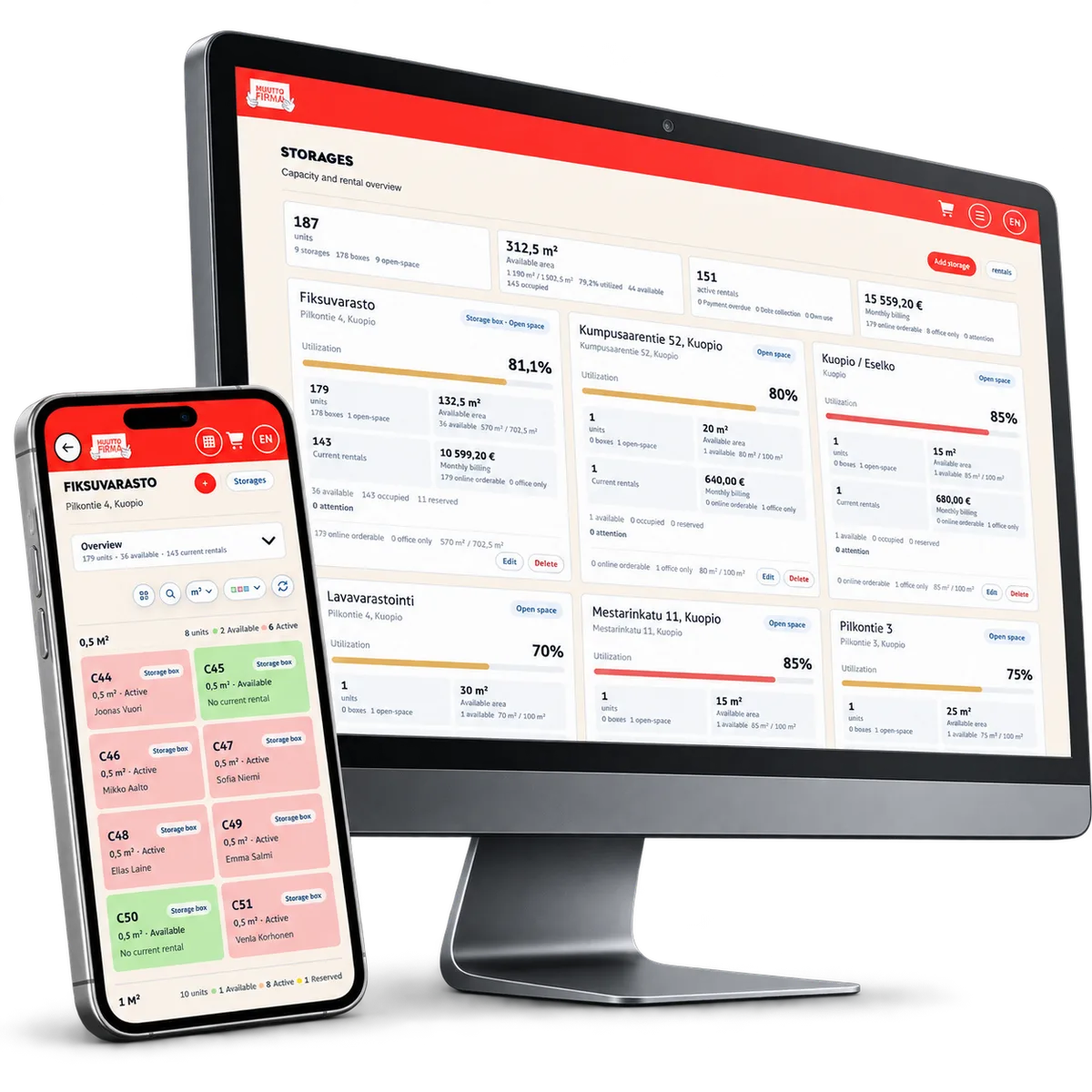
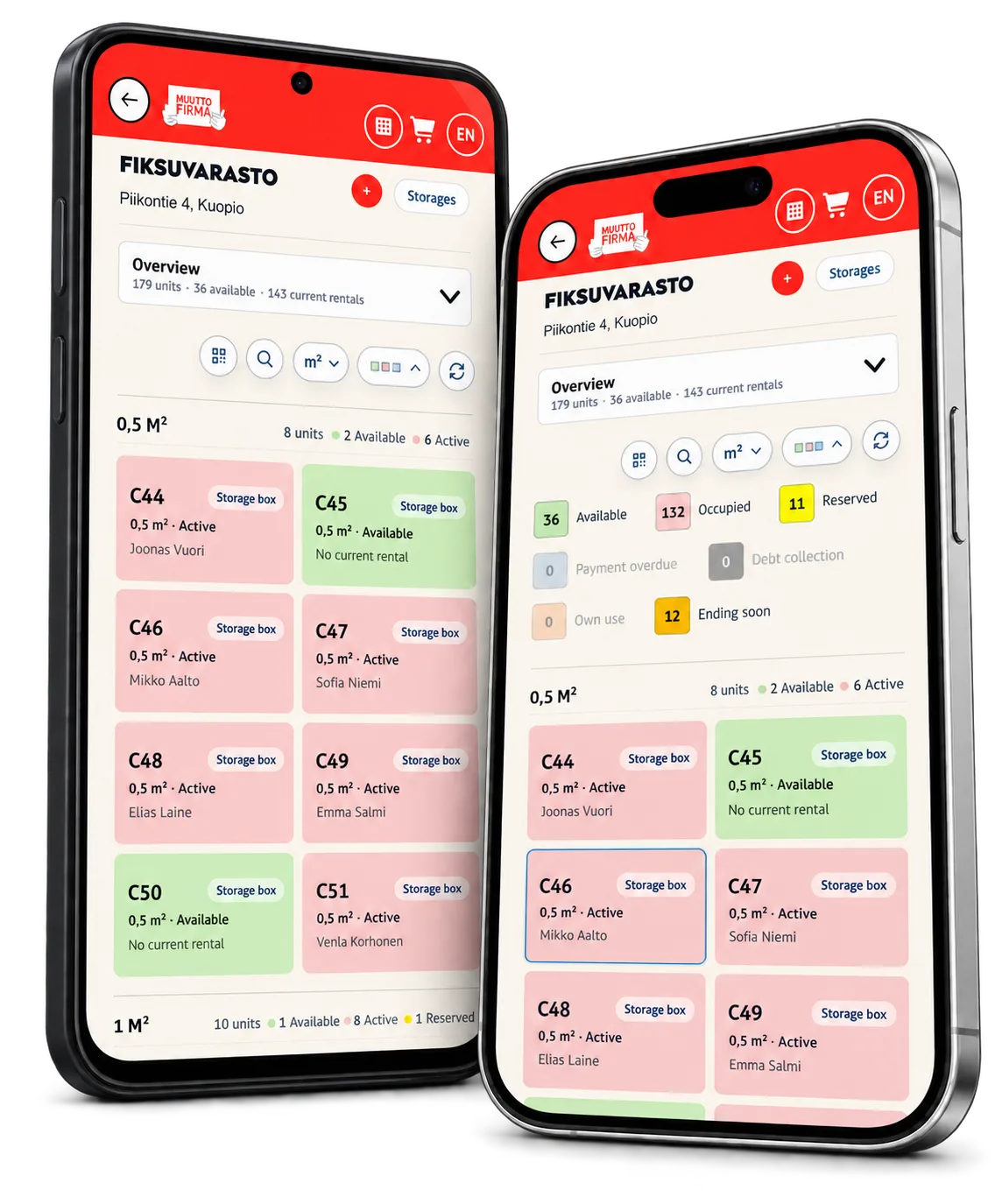
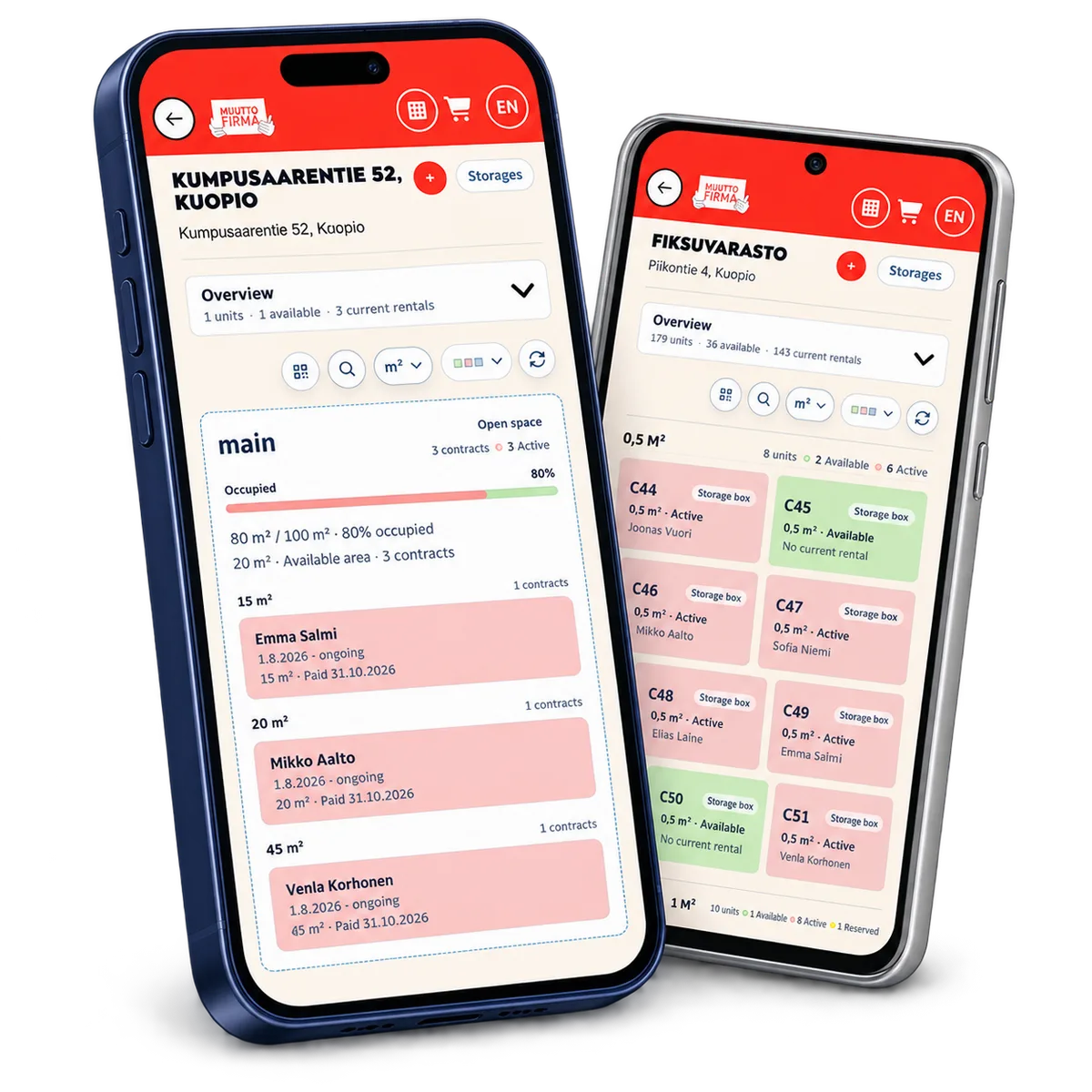
Individual storage boxes and shared open storage have different capacity rules. For open space, the system compares rented square metres with the total area. The operational view also identifies own-use rentals and agreements requiring payment attention, so staff can interpret availability in its business context.
The tenant and payer stay connected
The tenant and the organisation covering the cost can have different roles. Easy Storage keeps the rental, the organisation’s payment commitment, its coverage period and references connected. Invoice details and payment records stay with the agreement, so staff can serve the tenant while following the payer’s commitment.
Customers see their own agreement
The customer’s account separates current and past rentals and shows the location, unit, contract period and paid-until date. Contract and payment progress appear together, with a notice when payment coverage is overdue. Customers can check the information relevant to their storage without entering the management workspace.
A handover leaves a usable record
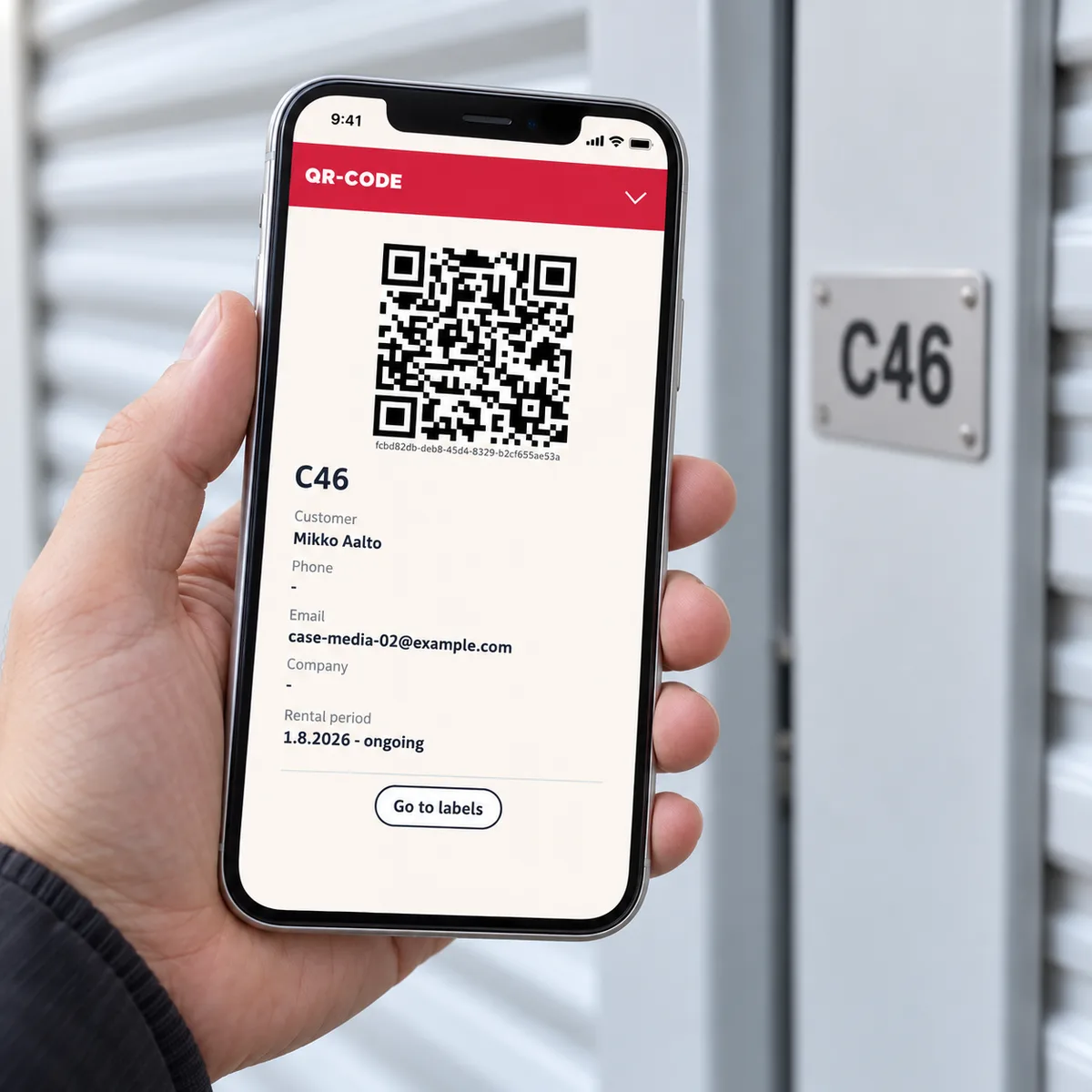
Rental labels have QR codes and a print queue with a printed state. Access-item records capture quantities, issue dates, return dates and notes. The history of rental starts, moves, endings and external updates gives staff a way to understand what happened when responsibility changes between people.
Product capabilities
What customers and teams can do
Operations
Space-first office workflow
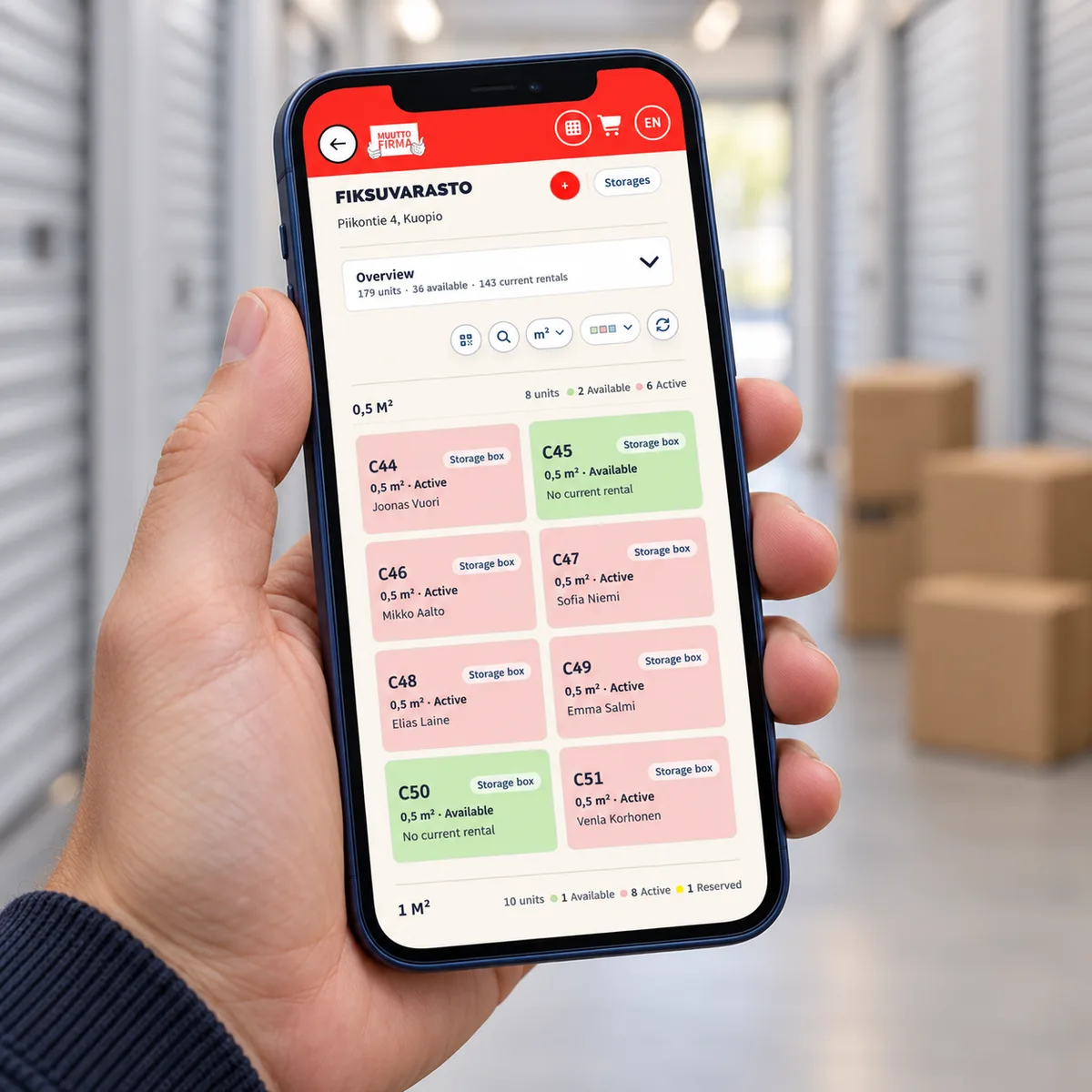
The storage map is a working entry point, not just a floor plan. Staff select a space on the map and move directly into its rental agreements and service information, so a customer question can be handled in the context of the actual location.
Every enquiry starts from the real space instead of a name or a paper file, so staff always work with the current agreement.
Catalog
Two storage models in one system
Easy Storage distinguishes enclosed storage boxes from open storage areas, where available square metres matter as much as the number of units. Each model is tracked with the measurements that actually describe it.
Operators offering both boxed and open storage do not have to force one model into the other.
Commerce
Online purchase to managed rental
In the connected Fiksuvarasto flow, a paid Shopify order is matched to the customer and the correct storage unit to create the rental automatically. Subscription references and any additional products stay attached to that same relationship.
Office staff work with one resulting rental instead of treating the webshop sale as a separate task to reconcile later.
Billing
Billing context kept with the agreement
Payment records, billing intervals and payment commitments are brought together for each rental, with subscription information available through the Bold integration. Staff can see the billing coverage recorded for a rental and follow up when something needs attention.
An operator sees more than a payment total — the billing history stays connected to the specific space and customer it belongs to.
Customer portal
Customer self-service view
Customers can open their own active and past rentals to see the unit, contract dates, billing information and status without contacting the office directly.
Routine questions about a rental's status or billing are answered by the system instead of a phone call.
Service catalog
Service details and lifecycle changes
A rental can include products such as locks and insurance options, issued access tokens and their return dates, plus support for moving a rental to a new unit or closing it at the end of a contract.
Staff manage the practical side of the service and its later changes through the same agreement instead of separate records.
Reusable platform model
Live use and rollout
production deployment
Fiksuvarasto storage rental platform
Easy Storage is a production solution developed under licence, operating the Fiksuvarasto storage rental channel end to end: online Shopify purchases, office bookings, Bold subscription billing and unit-lifecycle changes all connect to the same customer agreement.
How it works
Keep commerce and operations connected
Shopify connects the sale to the space
Fiksuvarasto’s online product identifies the corresponding storage unit. Order notifications bring the customer and purchased items into rental administration; existing rentals are recognised when an order is processed again. Availability tags connect warehouse changes back to the storefront, and integration events record whether those updates succeeded.
Bold keeps recurring payments in context
The Bold subscription reference links recurring commerce to the rental. Synchronisation brings in payment history and the next payment date, including recorded refund states. This information supports follow-up on the agreement rather than leaving staff to interpret a separate subscription record in isolation.
LogiApp carries the operational context forward
The LogiApp connection creates or updates the rental’s operational order with its customer, warehouse address, agreement dates and related details. References and status information can return to Easy Storage. The connection gives the surrounding operations a link to the same rental instead of a disconnected description of the job.
Bring existing agreements with you
A rental business keeps serving customers while its systems evolve. Easy Storage brings existing agreements and their billing-period history into the same working context as online orders and subscription-linked rentals. Staff can continue from the space and its agreement, with the history needed to handle the next customer enquiry.
Reusable platform model
What ReApptor can reuse from this case
Rental and recurring-service operating model
A reusable pattern for any business that sells time-based access to a resource: it connects the resource, the commercial agreement, billing and the service details that come with it.
- A new rental or subscription business can launch on a system already shaped around the full customer relationship instead of a bare booking calendar.
Ideal for
Storage operators, equipment rental businesses and other recurring-service companies selling access to a resource over time.
Connected webshop-to-operations handoff
The Shopify-to-rental matching pattern turns a paid online order directly into an operational record the office can act on, keeping subscription and product references attached.
- Removes the manual step of turning a webshop order into a working file, and keeps the two systems' references linked for troubleshooting.
Ideal for
Businesses selling a service or recurring product online where the sale must become real operational work, not a separate task.
Subscription billing brought into the agreement view
Bold subscription data is surfaced inside the same agreement view as manual payments and commitments, giving staff one place to check billing coverage regardless of payment source.
- Staff do not need to check a separate subscription system to answer a customer's billing question or confirm which periods are covered.
Ideal for
Businesses combining subscription billing (e.g. via Bold) with manually managed payments on the same customer agreements.
Screenshots and media
Screenshots and media
Bring your rental operations together
Tell us how you sell, bill and manage your rental service. ReApptor can connect your spaces, agreements, customer service and existing systems in an application shaped around your business.
Discuss your rental system